
−15%
Medic Props Pack
🚑 Intervention Pack - EMS 25 EMS props for FiveM.
€6.79€7.99
On sale — save 15%
Instant access via Tebex
- FiveM ready
- Instant delivery via Tebex
- Open source
🚑 Intervention Pack - EMS
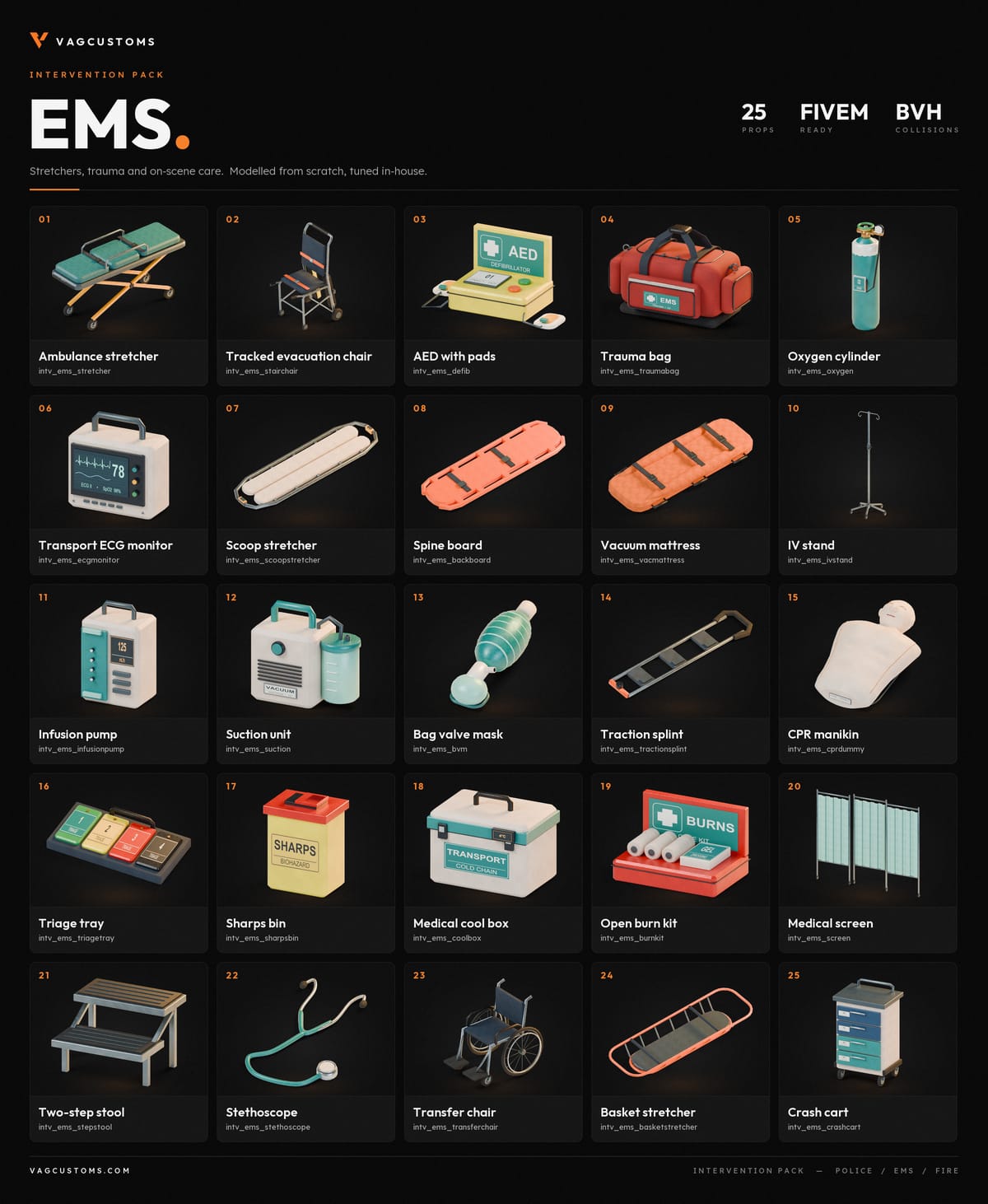
25 EMS props for FiveM. Modelled from scratch, tuned in-house.
🩺 Stretchers, trauma kits and on-scene care for your ambulance service. Every prop is streamed with real collisions and English labels, so your medics can set up a believable scene anywhere on the map.
📦 What's included
🛏️ Patient transport
- Ambulance stretcher
- Tracked evacuation chair
- Transfer chair
- Scoop stretcher
- Spine board
- Vacuum mattress
- Basket stretcher
❤️ Care and monitoring
- AED with pads
- Transport ECG monitor
- Oxygen cylinder
- Bag valve mask
- Suction unit
- Infusion pump
- IV stand
- Stethoscope
🩹 Trauma and kits
- Trauma bag
- Traction splint
- Open burn kit
- Triage tray
- Sharps bin
- Medical cool box
🏥 On scene
- Medical screen
- Crash cart
- Two-step stool
- CPR manikin
✨ Features
- ✅ 25 props, ready to stream
- 🧱 Real collisions on every prop
- 🇬🇧 English labels and markings
- 🔌 Works on ESX, QBCore, QBox, vRP and standalone servers. No dependency, no database.
- 🏷️ Clean model names (
intv_ems_*) that work in props menus, mappers, ox_target / qb-target and job scripts - 📋
models.lualists every model with its label
🔓 Open source
No escrow. You get the Lua and the stream files (.ydr / .ytd / .ytyp). Edit them for your server.
⚙️ Installation
- Drop
MedicPropsPackinto yourresourcesfolder. - Add
ensure MedicPropsPackto yourserver.cfg. - Restart your server. 🎉
➕ Also available: 🚓 Intervention Pack - Police and 🚒 Intervention Pack - Fire.
🌐 VAGCustoms - vagcustoms.com
- Category
- Emergency
- 3D preview
- Not yet
- Compatibility
- FiveM
- Category
- Emergency
- Type
- One-time purchase
- Price
- €6.79 (was €7.99)
- 3D preview
- Not yet
- Compatibility
- FiveM
- Delivery
- Instant, via Tebex
- Licence
- Use on your own servers
- 1Complete checkout — Tebex emails your receipt and the download straight away.
- 2Unzip the resource into your server’s
resourcesfolder. - 3Add
ensure <resource-name>to yourserver.cfg. - 4Restart the server.
Want to tweak the handling or optimize the textures? Read the workshop manual.
Need a hand? Our team is here to help.Discord support